There does not appear to currently be a way to pull a report on which Ramp charges have been repaid/requested for repayment. Are there any best practices for this? Is it possible to add a feature to the software to track repayment requests?
1 Like
You can use a filter for Repayment Status on the Accounting - Card Transactions screen. I saved a view set to Repayment Requested, Repayment in Progress, and Repayment Succeeded.
Hi Sarah - To pull the report you’re looking for, you can use the ‘Repayment Status’ filter on either the Accounting tab or Card Transactions tab. Additionally, you can view all repayments by going to Expenses > Card Transactions > click on the ‘…’ menu next to ‘Reminders’.
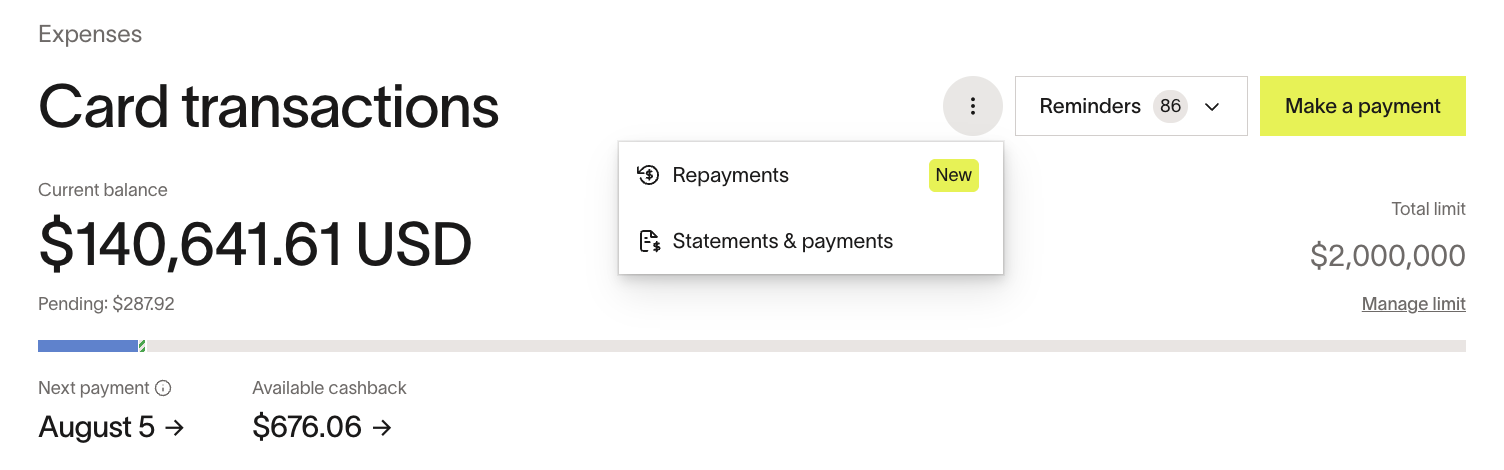
Hope this helps!
– Cailyn
2 Likes
We’ve had this issue as well. It would be great to have an option of being notified when a user submits for repayment. There are also no approvals needed which has caused issues with incorrect coding on the back end.
3 Likes
Any update on this one? This continues to be a needed feature for us. The request is two-fold.
- Admins (or whoever we designate) are notified when someone initiates a repayment.
- An approval flow (similar to a credit card charge) for the repayment, so that the approving manager also has visibility.