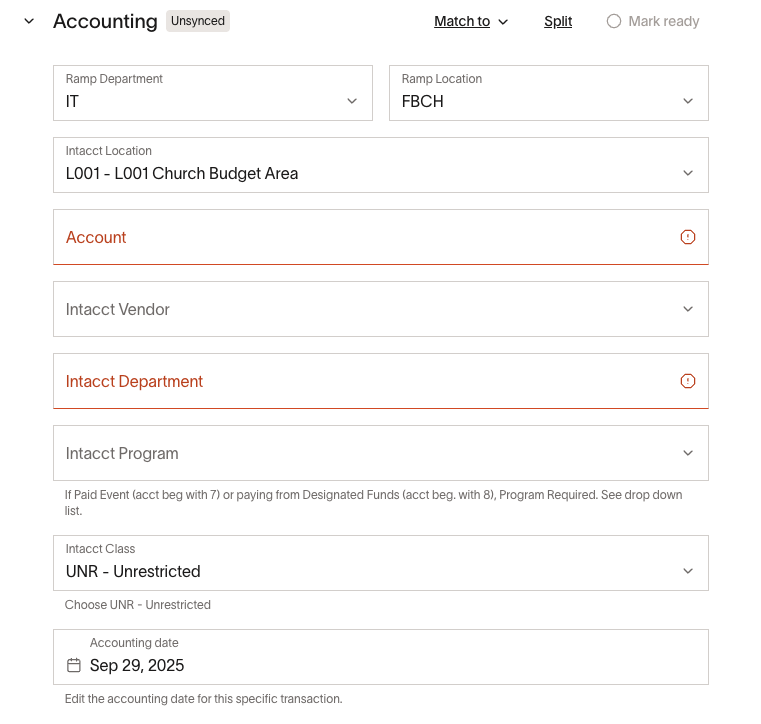
We have rules set that a person must select their department first before the account is set; however, account is always above the department in the order.
Is there a way to rearrange this in an order that makes “order of operations” sense?
We have rules set that a person must select their department first before the account is set; however, account is always above the department in the order.
Is there a way to rearrange this in an order that makes “order of operations” sense?
I think if you rearrange the fields in your accounting settings, it reorders them for the users.
Good suggestion. I did try that, but it doesn’t seem to make a difference on setting the order of operations.
Haven’t tried this yet, but it may be linked to your approval settings/expense settings. If you move the fields in that, it may change.
I now understand the issue that Ben has. Rearranging the fields in accounting settings will change the order of the fields for the user when they code the expense in the initial section. Clicking back into that expense at later stages, or scrolling down to the Accounting section of the page, shows the fields in a different order. It looks like the order is based on when they were created in the Accounting Settings. Would be nice if these could match the Accounting Settings re-order.